
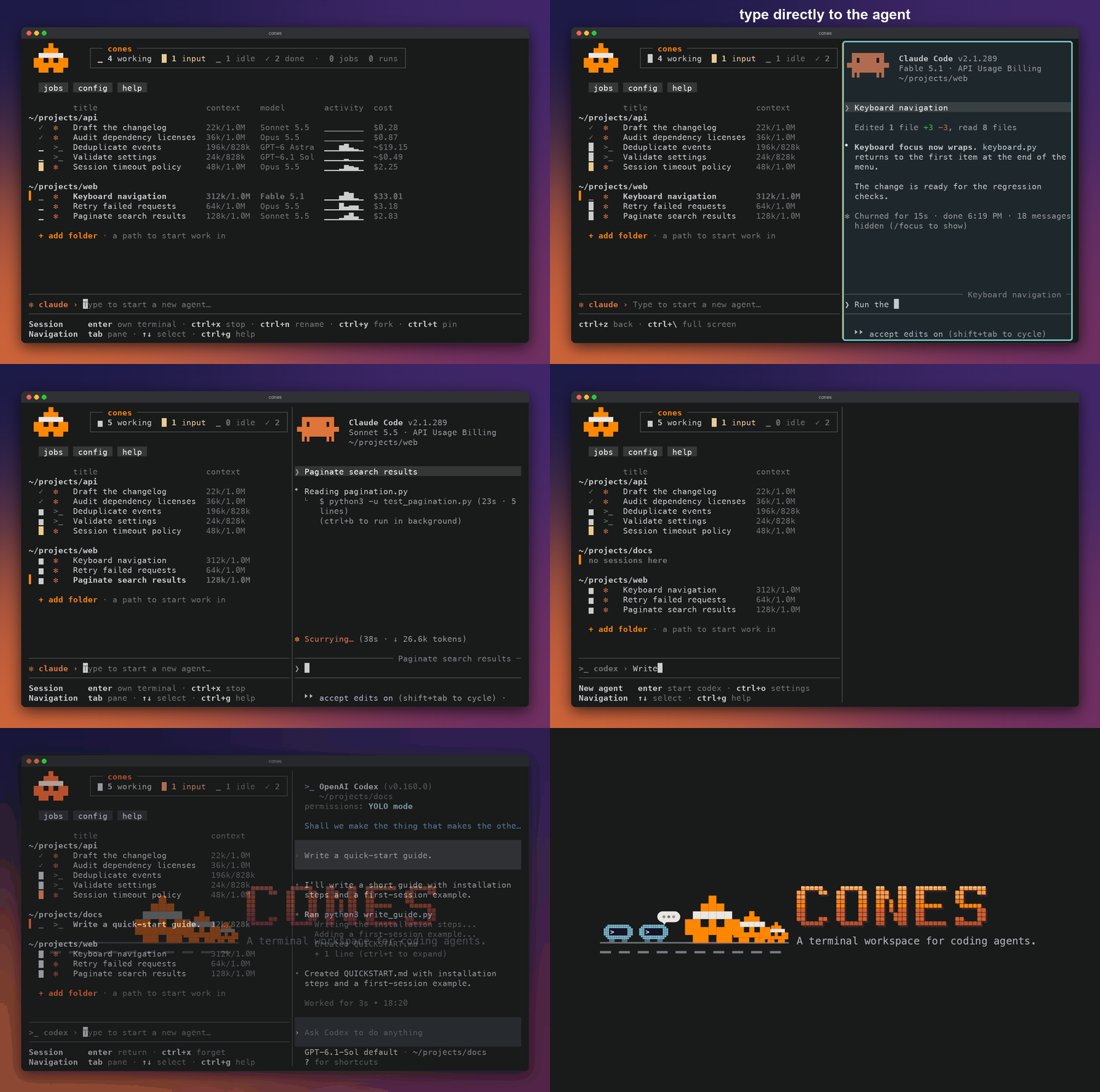
A terminal workspace for coding agents.
Browse sessions and history, peek into running work, and start agents across projects. Claude Code, Codex, pi and OpenCode keep their native terminal interfaces.
- Nothing to switch to. Keep typing
claudeorcodexwherever you do now; cones finds those sessions. Most agent workspaces only see agents started inside them (compare). - Every harness in one list. Claude Code, Codex, pi, OpenCode and Grok side by side, with their past conversations searchable in one place.
- Each agent stays itself. You work in the harness's own terminal interface, with its own permissions, settings and history.
brew tap YuvalSarel1/cones https://github.com/YuvalSarel1/cones
brew trust YuvalSarel1/cones
brew install cones
macOS only. Needs at least one configured harness. Or cargo install --git https://github.com/YuvalSarel1/cones.
Every supported session on the Mac, in one list
Run cones. Sessions you already have appear on their own, grouped by folder, including ones started in other terminals. No config file is needed.
Open a session in its own client
The selected session opens in a pane beside the list, running its native terminal interface. Type to it as you would in its own window. ctrl+z returns to the list with your draft kept.
A session in a terminal cones does not own can be watched read-only where cones reads its conversation. ctrl+y offers to take it over: cones stops that client and resumes the conversation in a pane here.
:attentionSee what needs you
The header counts working, input, idle and done sessions. A green ✉ marks a finished turn you have not looked at. Filter with :attention for input requests and unread completions, or :unread for completions alone.
History and search
Past Claude Code, Codex, pi, OpenCode, Grok, Copilot and Cursor Agent conversations appear below the live list. Type to search titles, folders and conversation text. shift+tab switches between word search and meaning search, which runs a local model. enter resumes the conversation in its recorded folder.
+ add folder shift+tab enterStart an agent in any folder
Select + add folder and type a path. shift+tab picks the harness, or terminal for a plain shell. Write an instruction and press enter. ctrl+o sets model, effort and provider.
Agents started here skip permission prompts by default. cones config set defaults.skip_permissions false keeps them.
Fork a conversation
Fork natively in Claude Code, Codex, pi or OpenCode, or hand the last 40 messages to a new session on a different harness. Forks run in the same folder; cones does not create worktrees.
Unfold a row
Model, context, tokens, cost, start time, transcript path and fork parent appear under the selected session. Model, context, tokens and cost are what the harness reports, and stay blank when it reports nothing. A cost shown with ~ is priced from the harness's reported token usage.
Close the dashboard and the terminals it hosts keep running. Reopen it and enter reconnects. A machine restart ends them; their history stays resumable. All keys: dashboard docs.
Bring the harness you already use
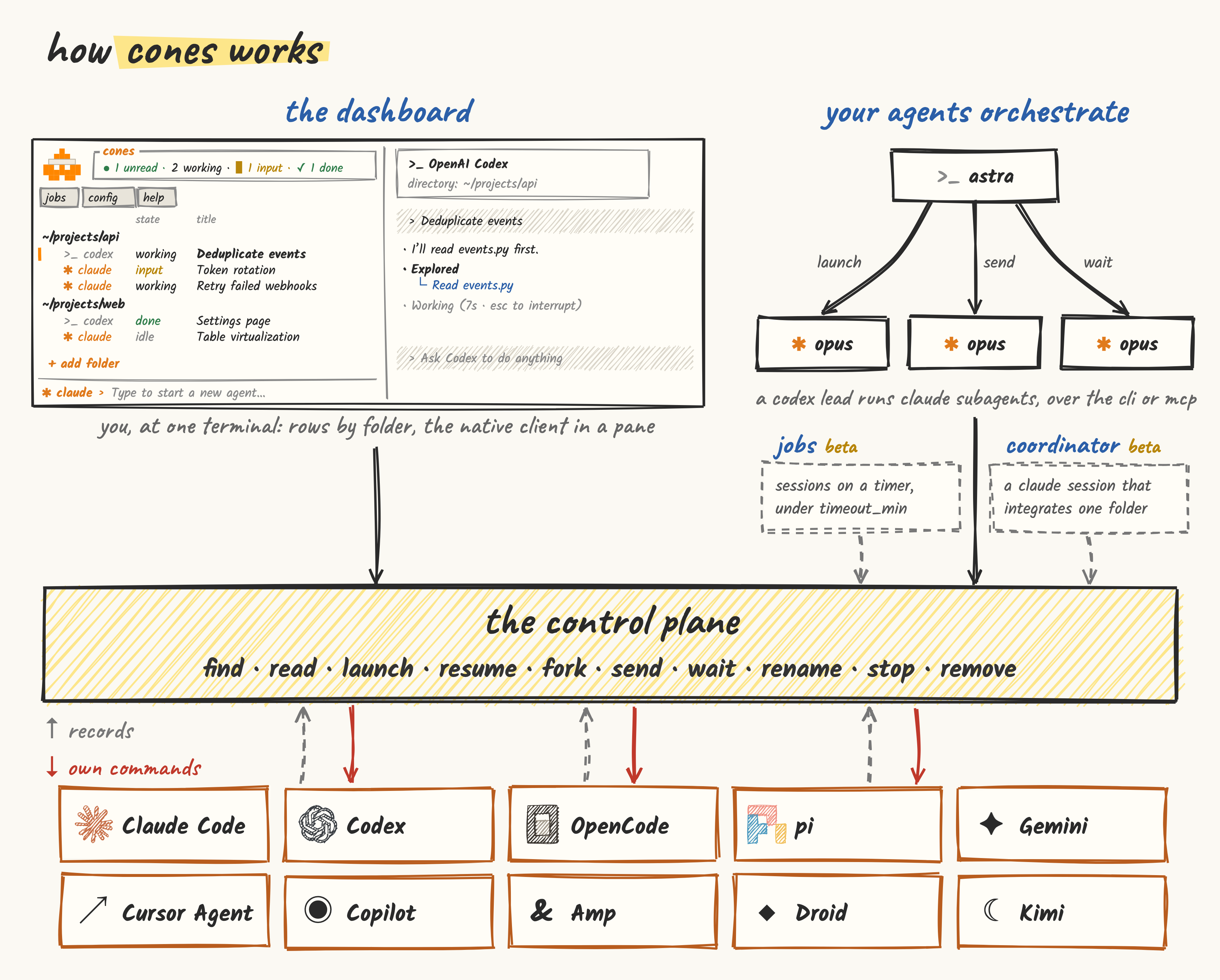
cones reads each harness's own records and runs its own commands. Permissions, tools and execution stay with the harness. What cones can do differs per harness:
| Harness | List and read | Launch, resume | Live state | Message a running session |
|---|---|---|---|---|
| Claude Code | ✓ | ✓ | ✓ | ✓ held for approval when the session skips prompts |
| Codex | ✓ | ✓ | ✓; approval waits on daemon threads only | Daemon threads |
| pi | ✓ | ✓ | ✓; dialogs in sessions cones hosts | Sessions cones hosts |
| OpenCode | ✓ | ✓ | Sessions cones hosts | Sessions cones hosts |
| Grok | ✓ | ✓ | ✓ | No |
| Gemini, Cursor Agent, Copilot, Amp, Droid, Kimi experimental | Process only; Copilot and Cursor history | Launch, with instruction delivery unverified; Copilot and Cursor resume | No | No |
A Claude Code session that skips permission prompts holds an incoming note until its user approves it, unless "crossSessionInbound": "accept" is set. Full matrix and the versions each path was checked against: harness support.
Optional: let your agents use it too
Every control-plane verb is a cones command, so an agent with a shell can find, read, start, message and stop sessions in any folder. cones mcp serves the same verbs to an agent without one. The dashboard installs a cones skill that tells agents how.
cones launchStart a session from a script or another agent
cones launch --dir ~/src/app --harness codex "rebase onto main"The session runs detached, its id is printed, and it shows up in your dashboard. A printed id means the client started; a client waiting on a sign-in or trust screen is still named.
cones showRead any conversation
cones show 4f0c2b1e-8d31-4a55-9f0c-6b2a17e4d900 --tail 5
cones search "why did we change the parser" --mode meaning --json
Reading attaches to nothing and writes no native state.
cones commsMessage the agents in a folder
cones comms --dir ~/src/app send SESSION_ID "text"
cones comms --dir ~/src/app wait --id SESSION_ID
Notes go through the harness's own delivery channel. Where a harness has none, sending is refused; cones never types a note into a terminal.
Coordinator
Starts a background Claude Code session that watches one folder's agents, handles overlaps and integrates their commits in order. Task scope stays with you and the workers.
cones runScheduled jobs
Run a Claude Code or Codex task on a cron schedule through launchd, with a timeout and a recorded outcome. Add one from the jobs menu or jobs.yaml. Jobs run without permission prompts, so give each one a folder whose risk you accept. Jobs docs.
Questions
What is cones?
cones is a terminal dashboard for macOS that lists your Claude Code, Codex, pi, OpenCode and Grok sessions in one place, wherever you started them. You open each one in its own native interface, search past conversations, and start new agents in any folder.
Do I have to start my agents through cones?
No. Keep starting claude, codex, pi or opencode as you do now. Their sessions show up in cones on their own.
Which agents does it work with?
Claude Code, Codex, pi, OpenCode and Grok. Gemini, Cursor Agent, Copilot, Amp, Droid and Kimi can be launched, with less support. What works where.
Does it change how my agents run?
cones adds no permission layer and intercepts no tool calls. Agents you start from cones skip permission prompts by default; cones config set defaults.skip_permissions false turns that off.
What happens when I close it?
Agents it started keep running. Reopen cones and press enter to get back in. A restart ends them; their conversations stay resumable.
Can I see sessions from other terminals?
Yes, and read their conversations. To type into one, ctrl+y moves it into cones.
Where do the numbers come from?
From each harness's own records. Anything a harness does not report stays blank. ~ marks a cost priced from the harness's reported token usage.
Does it touch my config?
It installs no global hooks. It adds a cones skill so your agents know how to use it. Everything it writes.
Does it send my data anywhere?
No. There are no cones servers, and nothing about your sessions or how you use cones leaves the Mac.
Does it make worktrees or review diffs?
No. It groups the worktrees you already have; review and merge with your own tools.
Is it open source?
Yes, under MIT or Apache-2.0, at github.com/YuvalSarel1/cones.